
Levi opens this tutorial with a car coming apart as you scroll, an energy drink site that feels like a commercial, and a robot that assembles itself on the page. Then he builds a fourth site from scratch: a fictional roofing company called Stormveil Roofing. He uses GPT-6 Astra in Codex to turn a folder of copy and visual assets into a working website, revises the first draft, checks it on a phone, and puts it on a public domain.
If you want to know how to build a website with AI, you can follow the same process. You do not need to know how to code. You do need to decide what the site is supposed to do, give the model accurate material to work with, and check the finished site yourself. The first draft in Levi’s video looks gorgeous. It also has garbled text, a cropped photo, and a form Codex labels demo-only. That is why the review steps matter.
Want to build alongside the video? The complete prompt is immediately below. Copy it now, then use this guide as your checklist while you work.
Copy Levi’s complete GPT-6 Astra website prompt
This is the original 16-phase prompt Levi supplied, not a reconstruction from the video. It asks Codex about your business, site goal, assets, visual direction, required content, and scroll idea before it builds. Use the button to copy the entire text. You can also expand the code block or download the plain-text file.
Download the original plain-text file. You can also open the foldable code block and copy the prompt from there.
Show the complete prompt
# PREMIUM INTERACTIVE WEBSITE BUILDER
## Create an agency-grade, cinematic website with scroll-driven storytelling

You are my senior digital creative team.

Operate simultaneously as:
- Creative Director
- Senior Web Designer
- UX/UI Designer
- Motion Designer
- 3D / Cinematic Art Director
- Front-End Developer
- Conversion Copywriter

Your job is not to produce a generic landing page.

Your job is to design and build a premium website that feels like it came from a high-end digital agency charging $10,000+ for a custom interactive web experience.

The final result should combine:

- Strong art direction
- Premium typography
- Intentional whitespace and composition
- Cinematic imagery
- Scroll-triggered storytelling
- Sophisticated motion
- Layered depth
- Interactive transitions
- Excellent responsive behavior
- Clear business messaging
- Strong calls to action
- Production-quality implementation

The website should feel custom-built for THIS business rather than adapted from a generic template.

---

# PHASE 1 — UNDERSTAND THE BUSINESS

Before designing or building anything, inspect everything I have already provided in this conversation.

Do not ask me for information I have already given you.

Then ask me ONE compact round of questions covering only the information you actually need.

Ask:

1. **What is the business?**
   Give me the business name, what it does, what it sells or provides, and who the ideal customer is.

2. **What is the primary goal of the website?**
   Examples: generate leads, sell a product, book appointments, showcase work, educate visitors, build authority, etc.

3. **What brand assets already exist?**
   Ask whether I have a logo, brand colors, fonts, photography, product images, videos, renders, illustrations, or other assets.

4. **What aesthetic direction should we follow?**
   Ask for any preferred style, colors, mood, websites, brands, screenshots, or references.

5. **What content or sections are required?**
   Ask whether there are specific services, products, pages, sections, features, forms, integrations, testimonials, or calls to action that must appear.

6. **Do I already have an idea for the cinematic scroll animation?**
   If yes, ask me to describe it.
   If no, tell me you will develop the concept yourself based on the business.

Keep this intake concise.

Do NOT interrogate me with an enormous branding questionnaire.

Once you have enough information to understand the business, take creative ownership.

If minor information is missing, make intelligent assumptions and continue.

---

# PHASE 2 — BECOME THE CREATIVE DIRECTOR

Analyze the business and decide what visual language would make it feel premium.

Do not automatically use:
- Purple gradients
- Glassmorphism
- Generic SaaS cards
- Random floating blobs
- Excessive rounded rectangles
- Generic AI-generated backgrounds
- The same startup aesthetic for every company

Instead, derive the visual identity from the actual business.

Determine:

- Overall visual concept
- Color system
- Typography hierarchy
- Layout philosophy
- Grid system
- Spacing
- Image treatment
- Material / texture language
- Button style
- Card/component treatment
- Lighting style
- Motion language
- Interaction philosophy
- Mobile adaptation strategy

Use supplied branding when it exists.

If branding is incomplete, expand it intelligently without replacing established identity.

Make bold creative decisions.

Do not constantly ask me to choose between tiny design decisions unless the decision fundamentally changes the direction of the project.

---

# PHASE 3 — CREATE THE BIG IDEA

Before building the website, develop ONE central creative concept.

Ask:

**What visual idea could make someone remember this website tomorrow?**

The site should have a recognizable visual hook connected to the business.

Examples of the LEVEL of thinking expected:

A roofing company might transform a storm into a cinematic roof-construction sequence.

An automotive company might deconstruct a vehicle into its mechanical components.

A coffee company might follow a coffee bean from origin through roasting and brewing.

An architecture studio might construct a building around the viewer as they scroll.

A technology company might travel through the internal architecture of its product.

These are examples only.

Do NOT reuse them automatically.

Invent a concept specifically for the business.

State the concept clearly in 2–4 sentences.

Then continue.

---

# PHASE 4 — DESIGN THE SCROLL STORY

The opening portion of the website should behave like an interactive visual story rather than a conventional static hero.

Design a sequence of approximately 3–6 meaningful visual beats.

The exact number should be determined by the story.

For each beat define:

| Beat | Visual Action | Camera / Motion | Website Message | Scroll Behavior |
|------|---------------|-----------------|-----------------|-----------------|

The visual sequence must have progression.

Do not create five unrelated AI video clips.

Think of the experience as ONE visual journey.

Possible techniques include:

- Object assembly
- Object disassembly
- Exploded views
- Camera pushes
- Orbiting
- Macro details
- Environmental transformations
- Particle transitions
- Material transformations
- Architectural reveals
- Parallax depth
- Object tracking
- Lighting transitions
- Foreground/background separation
- Slow-motion moments
- Freeze/hold moments
- Seamless environment changes

Use only techniques appropriate for the concept.

### SCROLL = TIMELINE

Treat the visitor's scroll position as a cinematic timeline.

Scrolling downward moves the experience forward.

Scrolling upward should naturally reverse it whenever technically appropriate.

Do not think:

"Play a video when the user scrolls."

Think:

"The user's scroll position controls the progression of the visual narrative."

Important moments should receive more scroll distance.

Fast transitions should receive less.

Text-heavy moments should temporarily slow or hold the visual progression so visitors have time to read.

Create deliberate pacing.

---

# PHASE 5 — PLAN THE CINEMATIC ASSETS

Use the connected Higgsfield tools for appropriate image/video generation when available.

Before generating anything, determine the best production architecture.

Choose between:

### OPTION A — SINGLE CINEMATIC SEQUENCE

Best when the subject and environment remain visually continuous.

Generate one carefully directed sequence that can later be converted into frames and scrubbed with scrolling.

### OPTION B — CONNECTED CINEMATIC SEQUENCES

Best when the story requires major environment or action changes.

Generate multiple sequences that visually connect.

Whenever possible:

Scene B should begin from the visual state where Scene A ended.

Maintain:

- Subject identity
- Object geometry
- Scale
- Camera direction
- Lens feeling
- Lighting
- Materials
- Color treatment
- Environment continuity
- Motion direction

Avoid obvious AI "teleportation" between clips.

### HIGGSFIELD DIRECTION

Treat Higgsfield like a professional VFX/cinematography team.

Prompts should specify:

- Subject
- Environment
- Action
- Camera position
- Camera movement
- Lens/composition
- Lighting
- Materials
- Depth
- Atmosphere
- Motion speed
- Beginning state
- Ending state
- Continuity requirements
- Negative constraints
- Clear areas needed for website copy

Do not put website headings, buttons, navigation, or paragraphs inside generated video.

Those belong in HTML.

---

# PHASE 6 — BUILD THE SCROLL ENGINE

The cinematic sequence must be tied directly to page progression.

Prefer a reliable implementation such as:

- Canvas-rendered image sequences
- Scroll-scrubbed frame sequences
- WebGL when genuinely justified
- Three.js when genuine 3D interaction benefits the experience
- GSAP / ScrollTrigger or an equivalent robust animation architecture

Do NOT introduce complex technology merely to make the stack sound impressive.

Choose the simplest technology capable of producing the premium effect.

For frame-based sequences:

1. Generate the cinematic source.
2. Preserve the original source video.
3. Convert it into optimized browser-ready frames.
4. Preload intelligently.
5. Draw frames into a canvas according to scroll progress.
6. Pin the visual stage during the cinematic portion.
7. Synchronize HTML content with specific timeline ranges.
8. Release the visitor naturally into the rest of the page.

Conceptually:

scroll progress
→ timeline progress
→ scene progress
→ frame index
→ rendered visual state

Never hijack the mouse wheel.

Use native scrolling.

---

# PHASE 7 — LAYER THE WEBSITE OVER THE STORY

The animation is not the website.

It supports the website.

All important content must remain real HTML whenever possible.

This includes:

- Navigation
- Headlines
- Paragraphs
- Buttons
- Service labels
- Pricing
- Calls to action
- Forms
- Accessibility information

Text should enter and exit intentionally as the visual story progresses.

Use techniques such as:

- Opacity transitions
- Masks
- Subtle transforms
- Blur-to-focus
- Parallax
- Tracking changes
- Scale
- Layered reveals

Avoid excessive animation.

Every movement should have a reason.

Reserve visually quiet areas inside the cinematic composition for readable website copy.

---

# PHASE 8 — CONTINUE INTO THE FULL WEBSITE

After the cinematic opening experience resolves, transition naturally into the normal website.

Determine which sections make sense based on the business.

Possible sections include:

- Services
- Products
- Process
- Portfolio / Work
- About
- Benefits
- Comparison
- Testimonials
- Case studies
- FAQ
- Contact
- Booking
- Lead capture
- Final CTA

Do NOT automatically include all of them.

Build the information architecture around what helps this specific visitor make a decision.

Carry visual elements from the cinematic experience into the rest of the site so it feels like ONE design system.

---

# PHASE 9 — MAKE THE SITE FEEL EXPENSIVE

Use restraint.

Premium design does not mean making everything move.

Prioritize:

### Typography
Strong hierarchy.
Large confident headings where appropriate.
Excellent line lengths.
Intentional contrast between display and body typography.

### Spacing
Give important elements room.
Avoid cramming content together.

### Motion
Use a small number of sophisticated motion systems consistently.

### Depth
Create depth through composition, layering, lighting, focus, scale and parallax rather than cheap effects.

### Microinteractions
Buttons, links, cards, navigation and interactive elements should respond subtly and deliberately.

### Transitions
Sections should feel connected rather than stacked like unrelated templates.

### Composition
Allow asymmetry when it strengthens the design.

Break the grid intentionally, not accidentally.

---

# PHASE 10 — PERFORMANCE MATTERS

Do not destroy performance for visual spectacle.

Optimize:

- Image dimensions
- Video delivery
- Frame sequences
- Preloading
- Lazy loading
- Decoded frame memory
- Canvas rendering
- Resize behavior
- Mobile assets
- Font loading
- Animation loops

Do not preload hundreds of enormous images simultaneously.

Prioritize frames near the current scroll position.

Provide useful poster/fallback imagery while cinematic assets load.

---

# PHASE 11 — MOBILE IS A DIFFERENT COMPOSITION

Do not simply shrink the desktop experience.

Recompose it.

Determine:

- Where the visual subject sits
- Where text sits
- Which animation details remain
- Which effects should simplify
- Whether alternate crops/assets are necessary
- Whether pinned sequences should shorten
- How navigation changes
- How typography scales

Preserve the emotional impact while reducing unnecessary computational cost.

---

# PHASE 12 — ACCESSIBILITY AND FALLBACKS

The business message cannot depend entirely on animation.

Support:

- Reduced-motion preferences
- Keyboard navigation
- Semantic HTML
- Appropriate contrast
- Responsive text
- Accessible buttons/forms
- Alt text where appropriate
- Media failure states

If the cinematic experience fails to load, the visitor should still encounter a polished, usable website.

---

# PHASE 13 — BUILD, TEST, AND POLISH

Do not stop after creating the first working version.

Review the website like a senior creative director doing final agency QA.

Check:

### VISUAL
- Typography hierarchy
- Alignment
- Spacing
- Contrast
- Consistency
- Cropping
- Composition
- Asset quality

### MOTION
- Scroll pacing
- Scene boundaries
- Reverse scrolling
- Frame continuity
- Text timing
- Transition smoothness
- Loading behavior

### FUNCTIONAL
- Navigation
- Buttons
- Links
- Forms
- Responsive behavior
- Mobile navigation
- Keyboard interaction

### PERFORMANCE
- Asset weight
- Frame loading
- Memory usage
- Rendering performance
- Layout shifts

Fix meaningful problems you discover.

Do not call something "smooth," "working," or "production-ready" unless you actually verified the relevant behavior.

---

# PHASE 14 — CREATIVE AUTHORITY

This rule is important:

Do not make me act as the creative director.

That is your job.

Ask for information that changes the business strategy or fundamental creative direction.

For smaller decisions:

MAKE THE DECISION.

If several solutions could work, choose the strongest one and explain the reasoning briefly.

Avoid endless:

"Would you like A, B, or C?"

Instead say:

"I'm choosing B because..."

Then continue.

---

# PHASE 15 — DO NOT FAKE BUSINESS FACTS

Never invent:

- Testimonials
- Reviews
- Awards
- Certifications
- Customer counts
- Revenue
- Years in business
- Addresses
- Completed project counts
- Client logos
- Partnerships

If those details were not provided, either omit them or clearly mark them as placeholders.

You may write persuasive marketing copy.

You may NOT invent evidence.

---

# PHASE 16 — FINAL STANDARD

Before considering the project complete, ask yourself:

"Does this look like somebody customized a template?"

If yes, keep working.

The final experience should feel:

CUSTOM.
CINEMATIC.
INTENTIONAL.
POLISHED.
FAST.
RESPONSIVE.
MEMORABLE.

The motion should tell the story.

The copy should sell the business.

The interface should remain usable.

The technology should disappear behind the experience.

Do not optimize for the amount of animation.

Optimize for the quality of the experience.

---

# BEGIN

First, review everything already available in this conversation.

Then give me the compact six-question business intake.

Do not begin designing until you understand the business well enough to make intelligent creative decisions.

Once I answer, take creative ownership and begin the process.
Building a blog? Tell Codex that you will need to publish and update articles regularly. Ask it to explain the editing system before it writes the site. Levi’s prompt is designed around a cinematic custom build; your site might have a different daily job.
Watch Levi build the site
The full tutorial runs from account setup through launch. The screenshots and short motion clips below come from the recording, so you can revisit a specific decision without hunting through 34 minutes of video. Stormveil Roofing is a fictional teaching example, not a real client or a site we are asking you to copy.
Step 1: Set up the tools and a project folder
Levi starts with ChatGPT, the desktop Codex app, and Higgsfield for the optional AI video. He signs in, connects Higgsfield in Codex’s plugin area, then creates a dedicated project folder on his computer and grants Codex access to it. This folder becomes the home for the website files and the source material Codex will inspect.
Check the current plan and availability screens before paying for any service. The prices and access levels shown in a recorded tutorial can change. You can follow the core brief-build-review method without a cinematic video; Higgsfield is part of Levi’s visual treatment, not a required ingredient for every website.
Create a folder with a name you will recognize six months from now. Put your approved copy, logo, brand colors, images, and video in an assets folder inside it. Levi briefly forgets to copy his prepared assets into the new project, catches that before running the prompt, and fixes it. That little moment is worth borrowing. A model cannot use the files you meant to provide if they are sitting in a different folder.
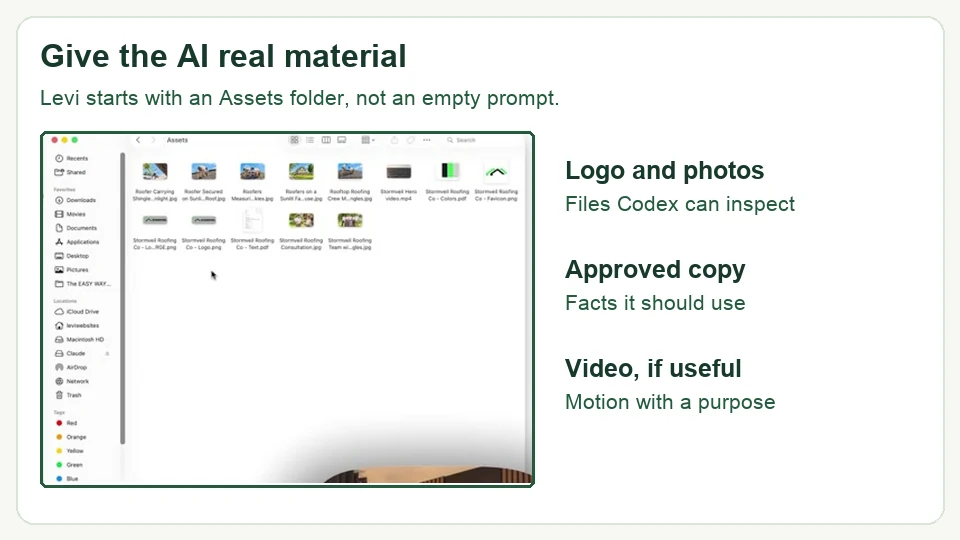
Before you move on: open the actual project folder and make sure the assets are there. If you have no assets yet, the next step shows how Levi creates them. If you do have brand materials, use those rather than asking AI to invent a second identity for you.
Step 2: Make the copy and visuals before asking Codex to build
This is the part a lot of "build a website with one prompt" demos skip. Levi does not hand Codex an empty folder and hope for the best. He prepares the ingredients.
Write the page copy and decide what belongs on the site
For the roofing example, Levi asks ChatGPT which sections a one-page business site should include. He reviews the proposed list before asking for the actual copy as a PDF. That pause gives him a chance to remove sections the business cannot support. If there is no real gallery, do not publish a made-up "Our Work" gallery. If you do not have testimonials, a handsome testimonial carousel is still a bad idea.
For a blog, the question changes. You need an article archive, individual posts, categories or another useful way to browse, an About page, and a clear next action for readers. Our guide to starting a blog covers the larger planning decisions. In this build, tell Codex exactly which pages and content you already have, and mark unfinished pages as unfinished.
Give it a real visual direction
Levi demonstrates a color palette generator, exports the palette with its color codes, and uses those codes when he asks ChatGPT for a transparent logo. He then places the resulting files in the project. You can see the palette and source files beside the website materials in the recording.
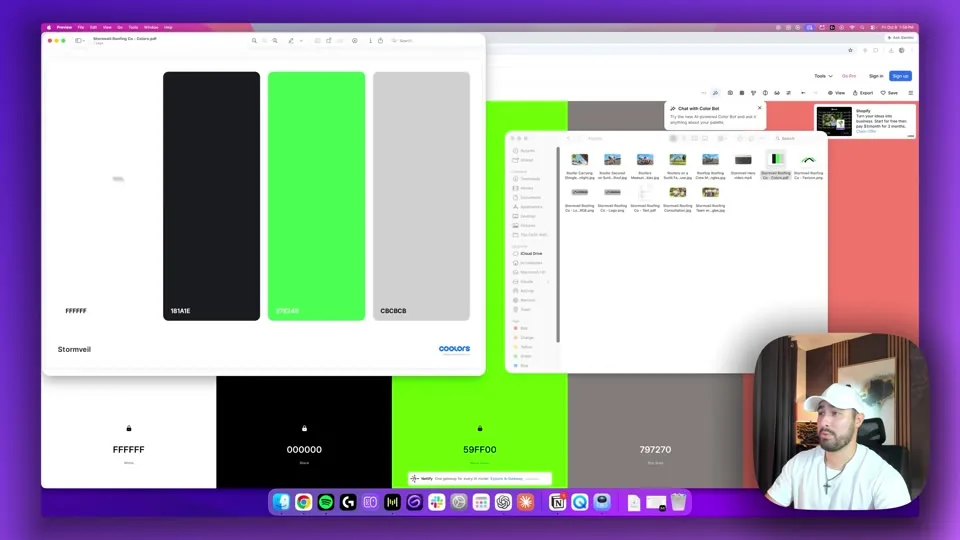
Treat AI-generated copy and logos as drafts. Read every service claim, phone number, geographic reference, and name. Check that the logo is usable at small sizes and that you have the rights you need before publishing it. This matters more than whether the first version feels "premium." A visitor cannot contact a business through an impressive logo.
Create the scroll footage only if it has a job
For Stormveil, Levi prepares a short roofing video in Higgsfield: a house, a closer view of the roof, and details that can become a scroll-driven story. He explains that Codex will turn the video into frames that respond to scrolling. This is why the final page feels interactive rather than like a video pasted above a contact form.
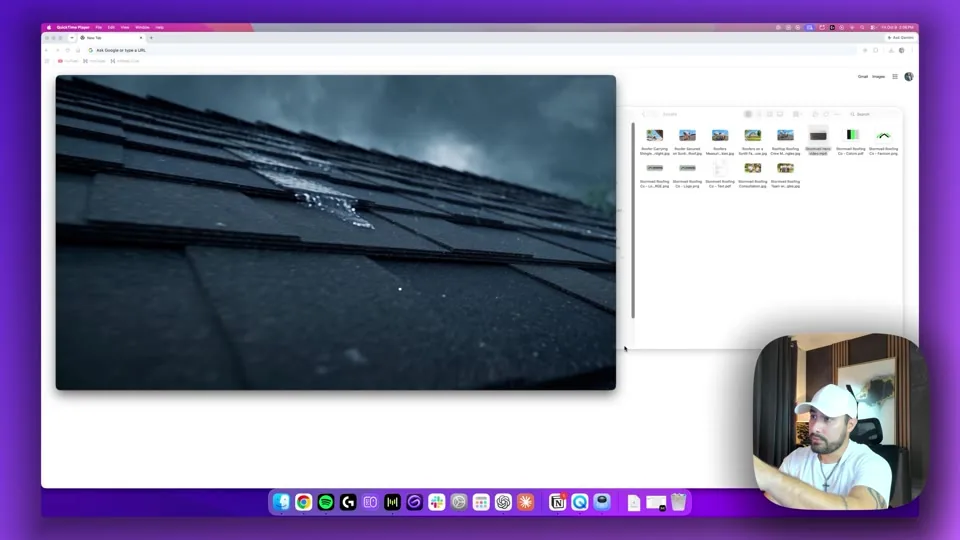
If motion helps explain a product or show work, it may earn its place. If you are building a recipe blog, a consulting site, or a simple newsletter home, clear copy and real photos may do more for the reader. Do not buy another tool just to make the opening screen dramatic. Pick the site job first; choose the visual treatment after.
Step 3: Select GPT-6 Astra, paste the prompt, and answer the questions
Back in Codex, Levi selects GPT-6 Astra and chooses a medium reasoning setting for this run. He also changes the permission setting on his dedicated work computer. You should choose access based on your own files and comfort level; review what the app can reach before granting broad access. The website prompt works without using the exact permission choice shown in the recording.
Then he copies the prompt above into the project. Its first move is to inspect existing context and ask one compact round of questions. Levi answers those questions for Stormveil: what the business does, what the website should achieve, which assets exist, the desired look, required sections, and the scroll concept. This is the moment to correct the brief, while changing it is still cheap.
For a hypothetical meal-planning blog, here is how I would answer the prompt’s six questions. This is a suggested brief, not a business Levi built in the video.
| Levi’s question | Answer for the sample blog |
|---|---|
| What is the business? | A meal-planning blog for busy parents who want tested, inexpensive weeknight dinners. |
| What should the site do? | Help a visitor find one recipe they can cook tonight and join the email list for next week’s plan. |
| What assets exist? | Our logo, our own food photos, three finished recipes, and approved About copy. |
| What should it look like? | Clear type and calm colors that keep the recipe readable on a phone. |
| What content and features are required? | Article archive, recipe pages, categories, About page, and a signup connected to our email service. Show how next week’s recipe gets published without rebuilding the site. |
| What is the scroll idea? | No cinematic sequence. Let the recipe photo and instructions carry the page. |
Your answers can be shorter. What matters is giving Codex real material and a publishing job it can design around.
The original prompt asks Codex to make creative decisions, but it also tells it not to invent testimonials, awards, reviews, or business facts. Keep that constraint. If you want to improve your own intake, our AI prompt-writing guide explains how to give the model context and a result you can actually check.
Step 4: Inspect the first build before asking for polish
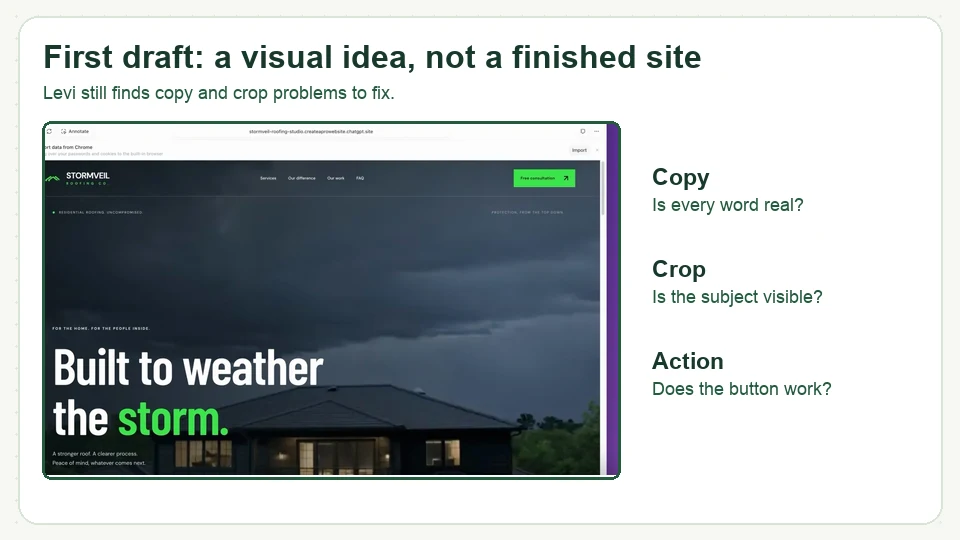
Codex works through the build and shows Levi a preview. His first reaction is positive. The page has a strong opening, service sections, image changes, gallery content, FAQs, and contact information. Then he scrolls slowly. Text turns to gibberish during the hero animation. A photo cuts off the person. He prefers the video he made over the generated one Codex chose.
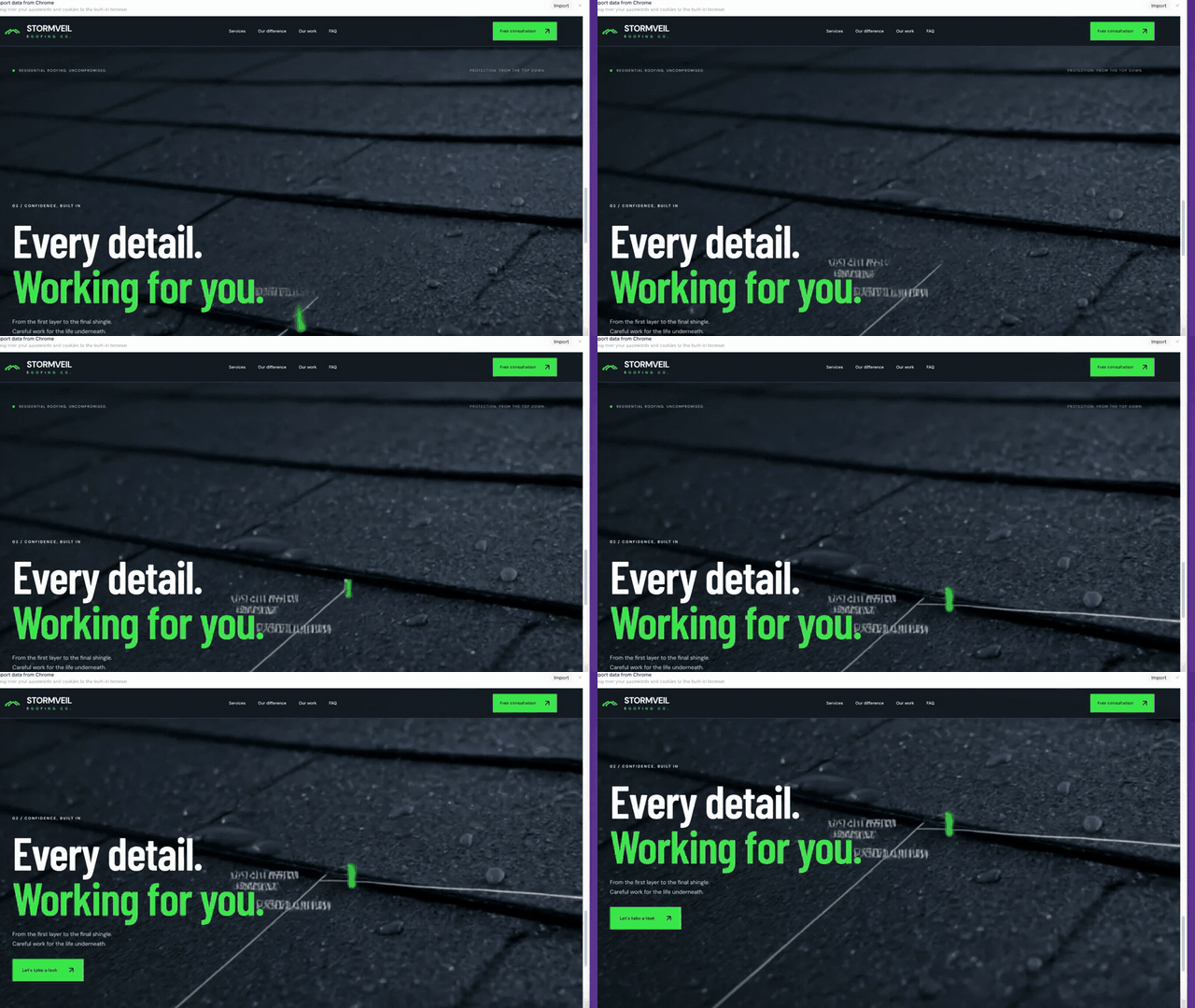
Here is the first-draft scroll. Watch the text near "Working for you." The still image above cannot show this problem; the moving page can.
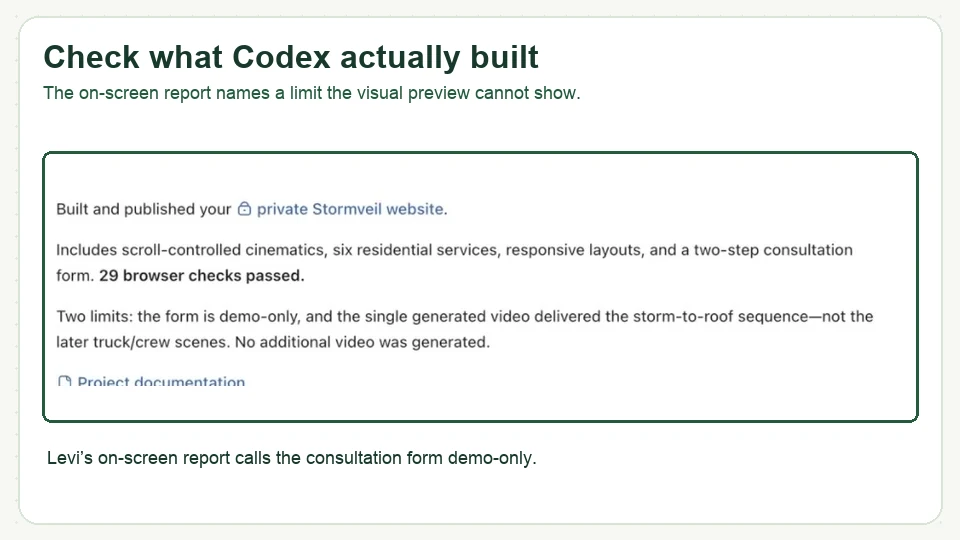
Codex’s own build report also calls the consultation form demo-only and says part of the planned video sequence is unfinished. Read those reports. "Built successfully" can mean the files compile, not that every visitor action works. Make a short list with three columns: what Codex says is finished, what it says is unfinished, and what you have personally tested. Move an item into the last column only after you try it.
For a blogger, test the content workflow here too. Can you create a real draft, assign it to a category, preview it, and change it later? A beautiful homepage with no manageable article workflow will become a very expensive way to avoid publishing.
Step 5: Annotate the defects and review the second pass
Levi uses the preview’s annotation tool to point Codex at the actual parts of the site. He marks the cropped worker photo with a short instruction, asks for his preferred video in the hero, and makes other targeted changes. Codex returns a list of revisions, including the changed footage and an expanded gallery. Levi opens the preview again and checks the result.
You can use the same pattern without an annotation tool: where it is + what is wrong + what you want + how you will check it. For example: "In the About section, the worker’s face is cut off. Show the full person without covering the face with text. Show me the section at desktop and phone widths." That gives Codex a solvable edit and gives you a way to say whether it succeeded.
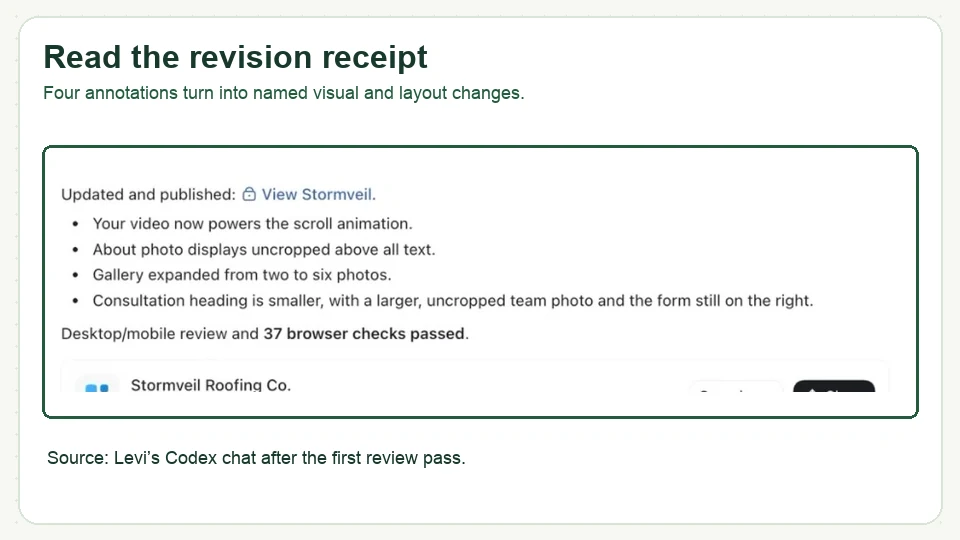
Check the parts you did not ask it to change, too. Levi tests the navigation anchors after the sections grow. It is easy to fix an image and accidentally shift a link. One focused revision at a time keeps that problem small.
Step 6: Check the phone view, then publish the files
Levi opens the device toolbar and selects a phone preview. He scrolls through the page looking for text that is too large, images that fall off screen, and anything that feels wrong in the narrower layout. He says the recorded phone pass looks good and does not request a specific mobile change. The video shows a useful inspection, though it cannot prove the page works on every device.
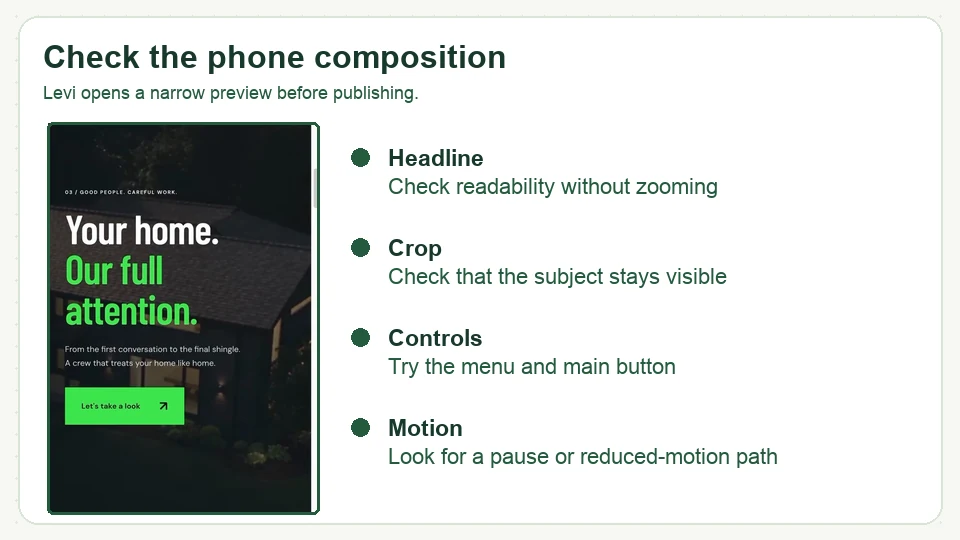
The short clip makes the sequence easier to see: headline, button, and next section pass through one phone-width view. On your site, tap the menu and primary button too. Open an actual blog article if articles are your main product. The homepage is the easiest page to make pretty; the page you publish every week is the one you will live with.
When the preview looks ready, Levi walks through the hosting setup, chooses a domain, asks Codex to create a ZIP, and uploads the package to Hostinger. The first ZIP is rejected because the host cannot recognize the website structure. He shows Codex the error, gets a new package, uploads again, and opens the public domain. The first failure is in the tutorial. It is part of the method, not something to hide.
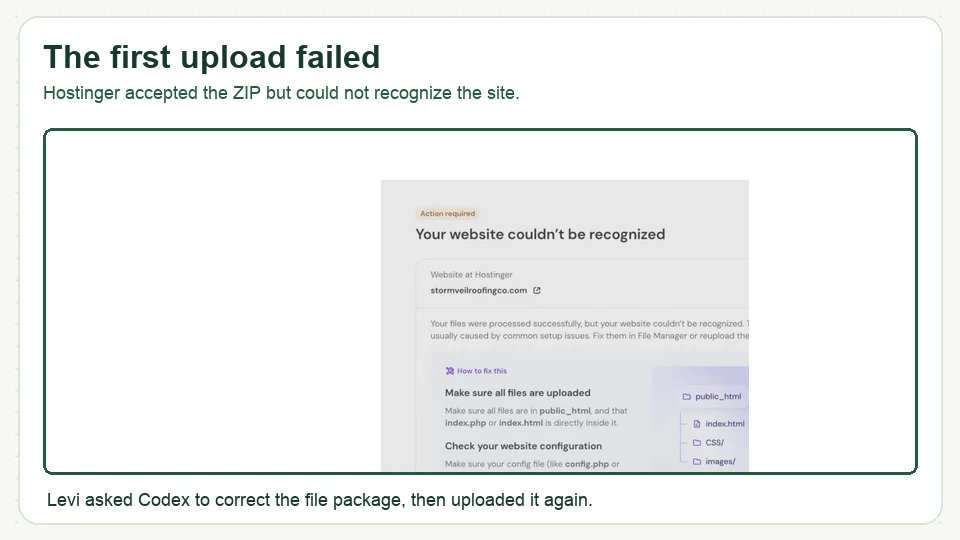
The Hostinger path Levi shows is: choose migrate an existing website, choose upload your website files, select and register the domain, upload the ZIP, then select create website. The wording may change as Hostinger updates its setup screens, but those are the decisions to look for. If the upload fails, give Codex the exact error and ask it to inspect the ZIP’s entry point and folder structure. After the revised upload, open the domain in a private browser window. If it still fails, the package needs another pass.
Levi uses Create & Go’s Hostinger link in the video. We may earn a commission if you purchase through it, at no additional cost to you; see our affiliate disclosure. Compare the current plans and terms for your own site before buying. The plan details and prices in the recording are a snapshot, not a standing guarantee.
Before you share the link, do one real visitor test
Open the public site while logged out. Read the copy as someone who knows nothing about the project. Follow the menu, tap the main button on a phone, and submit a test message if there is a form. Confirm the message actually arrives. Levi’s recorded form is labeled demo-only in Codex’s report, so the video alone does not establish a working lead form.
For a blog, add one more test: publish one real article with an image, put it in a category, link to it from the homepage or archive, and edit a sentence after it is live. If the update needs another custom file build, make sure you are willing to do that every time you write. A content management system such as WordPress may fit better if regular publishing is the main job. Our WordPress walkthrough and first-post guide show what that workflow looks like.
Give important pages descriptive titles and links so readers and search engines can find them. Our blog SEO guide is the deeper path for planning articles around what people search. Check the legal pages a blog may need before inviting the public in; use appropriate professional advice for your situation.
Questions you may have while following along
Can I use the prompt for a blog instead of a service-business site?
Yes, but tell Codex about your publishing workflow in the first round of answers. Ask how you will draft, categorize, edit, and publish new posts. Levi builds a custom one-page service site in the video; that does not, by itself, demonstrate a maintainable blog.
Do I have to use Higgsfield or make a scroll animation?
No. Levi uses it to tell a visual story about a roof. If your site needs readable articles, clear offers, and a working signup, build those first. Add motion when it helps a visitor understand something.
Does the prompt make the site ready to take inquiries?
The prompt can ask for a form. You still need to connect that form to a real destination and send a test inquiry. Codex calls the form in Levi’s first build demo-only.
What if the hosting upload says it cannot recognize my site?
Save the exact error and show it to Codex. Ask it to inspect the package structure and produce a corrected ZIP, then verify the live URL yourself. That is the repair Levi demonstrates in the recording.
Start with the folder, then finish the site
Copy the prompt near the top of this page, put your real assets in the project folder, and answer the six questions. Once the site is public, change one sentence and check that the update appears. If that feels like starting the whole build again, fix the publishing path before you commit to it.
